How To Get My BVN Number on My Phone

Title: How To Check My BVN Number on My Phone: Simplifying Banking Verification

Cheap Data are essential to enjoy smooth Internet experience, visit http://www.mydatafactory.com.ng to get extremely cheap data of all Networks; such MTN, GLo, Airtel, and Etisalat

Introduction:

In today’s digital age, banking processes have become increasingly convenient and accessible. One such development is the introduction of the Bank Verification Number (BVN) system, which has streamlined account verification and enhanced security in the banking sector. However, many individuals may find it challenging to remember their BVN number. Fortunately, with the widespread use of smartphones, checking your BVN has become a hassle-free process. In this article, we will guide you through the simple steps to check your BVN number on your phone.

Step 1: Download the Mobile Banking Application

The first step in checking your BVN number on your phone is to download your bank’s official mobile banking application. Most banks have developed user-friendly and secure mobile applications that allow customers to perform various banking activities, including checking their BVN details. Visit your smartphone’s app store and search for your bank’s mobile banking application. Download and install the app on your device.

Step 2: Register and Sign In

Once the mobile banking application is successfully installed, open it and proceed with the registration process. Usually, you will have to provide your account details, such as your account number, ATM card details, and other necessary information. Follow the app’s instructions to complete the registration process.

After successful registration, sign in to the mobile banking app using your username and password. Some banks also offer alternative login methods, such as fingerprint or facial recognition, for added convenience and security.

Step 3: Locate the BVN Option

Once you have logged in to the mobile banking app, navigate through the app’s menu to find the BVN option. The exact location of this option may vary depending on your bank’s app design, but it is typically found under the “Profile” or “Settings” section.

Step 4: Access Your BVN

After locating the BVN option, click on it to access your BVN details. Your BVN number will be displayed on the screen. Take note of the number or simply save it as a screenshot for future reference.

Step 5: Confirm BVN Accuracy

After retrieving your BVN number, it is crucial to ensure its accuracy. Crosscheck the number with any official documents, such as your bank statement or BVN card, to verify that the information provided matches. In case of any discrepancies or doubts, contact your bank’s customer service immediately for clarification.

Conclusion:

The ability to check your BVN number on your phone has simplified the task of getting BVN.

Cheap Data Plans In Nigeria

Visit: http://www.mydatafactory.com.ng to get cheapest data bundles of all Networks. Nigeria is known for its high cost of data, but there are still some affordable options available. Here are a few ways to get cheap data in Nigeria:

  1. Compare different mobile network providers: Different providers offer various data plans at different rates. Compare prices, data allowances, and network coverage to find the most affordable option for your needs. Some popular network providers in Nigeria include MTN, Airtel, Glo, and 9mobile.
  2. Use data-only plans: If you primarily use the internet for browsing, streaming, or downloading, consider opting for a data-only plan instead of a voice and data bundle. These plans are generally cheaper and offer higher data allowances.
  3. Take advantage of special offers and promotions: Network providers in Nigeria often run promotions and special offers on data plans. Keep an eye out for these deals, as they can provide significant savings on your data costs.
  4. Use Wi-Fi hotspots: When available, connect to Wi-Fi hotspots to save on your mobile data usage. Many cafes, restaurants, and public spaces offer free Wi-Fi, allowing you to browse the internet without consuming your mobile data.
  5. Consider data resellers: Some individuals or businesses like http://www.mydatafactory.com.ng buy bulk data from network providers and resell it at a lower price.
  6. Look for reputable data resellers in your area or online to get cheaper data plans.
  7. Activate data-saving features: Most smartphones have built-in data-saving features that can help reduce your data usage. Enable these features to optimize your data consumption and minimize unnecessary background data usage.
  8. Monitor and manage your data usage: Keep track of your data usage to avoid exceeding your plan’s limits. Set data usage alerts on your device or use third-party apps to monitor and control your data consumption.

Remember to always research and compare different options to find the best and most affordable data plan that suits your needs in Nigeria.

MyData Factory Help Centre

Welcome To MyData Factory, our website https://www.mydatafactory.com.ng

Download the App now on Google playstore

Download MyData Factory app now

Frequently Asked Ouestions

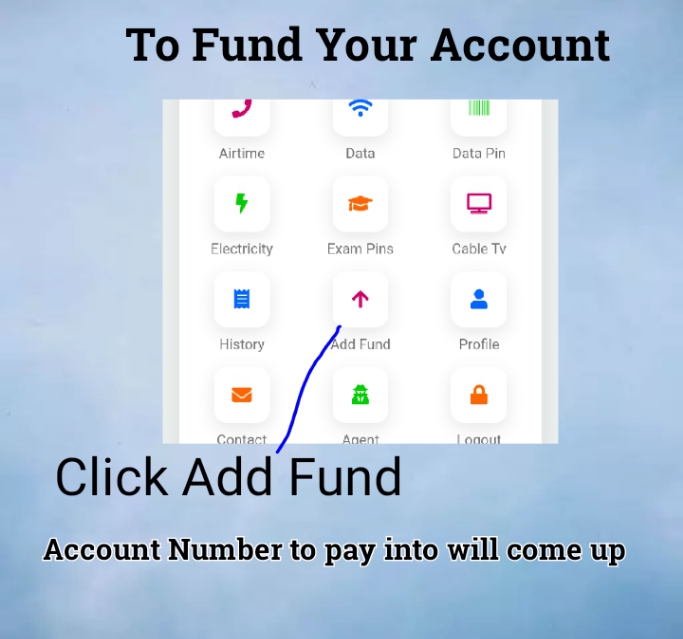
1. How To Fund Your Account:
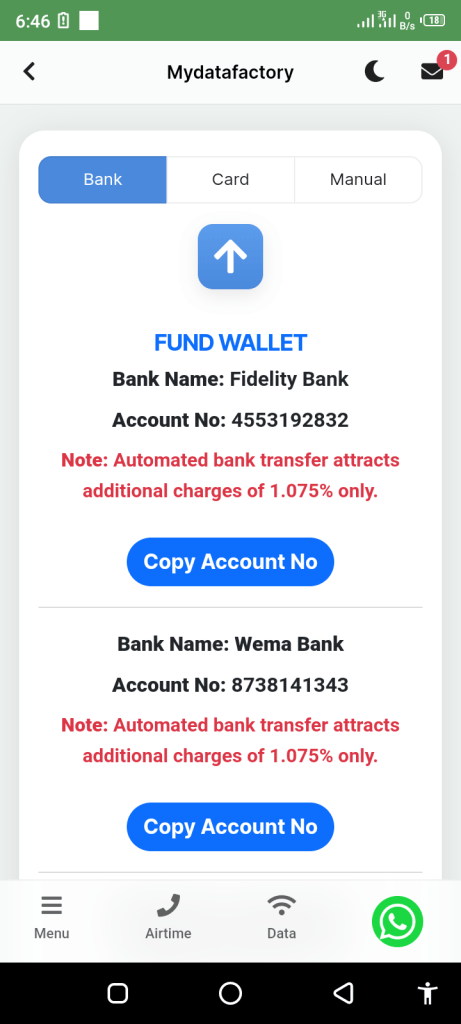
To fund your wallet, click add fund, account numbers to pay into will be displayed. Your money will be credited immediately to your wallet. Then, you will see airtime, data, and other services . Click data, select your network, select the amount, input the telephone number and press send

2. For instance, if you want to buy MTN 1Gb which is N230, you may fund your wallet with N300 or N500. After you have purchased your data, your remaining balance will show in your wallet which you can use some other time.


3. I got a’ Processing’ message when I purchased data: It means your internet connectivity is slow. Don’t resend it, it will enter.


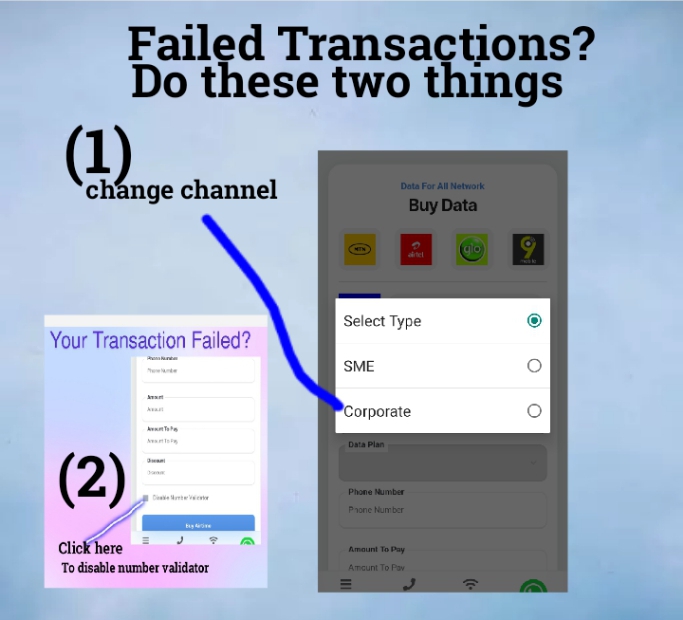
4. I got an’ error’ message: Click the disable number validator box before you press the Buy button
I’m unable to download the app: Request for it on WhatsApp

5. I have paid but the money is not reflecting on my page: It is network from the bank and it should reflect within 5 minutes. If, after 5minutes, it is not reflecting, contact the customer’s care on their WhatsApp.


6. My Data Subscription Failed? Do these 2 things 1. Click disable Number Validator

7. Change Channel from either SME or Corporate

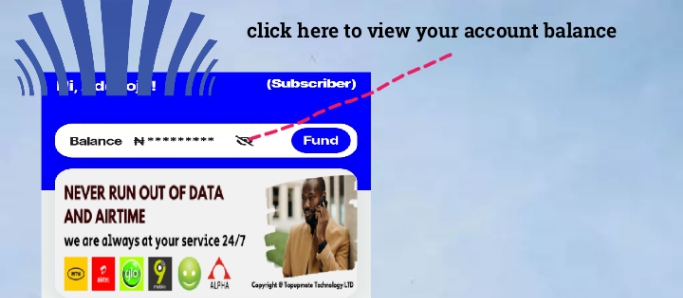
8. My Balance Is not Showing: click the eyes button infront of your account balance

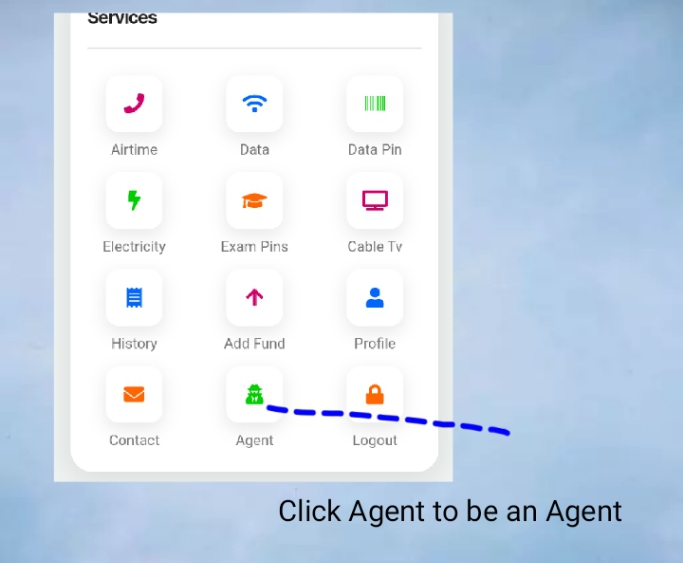
9. How can I be an Agent? Click Agent on Your dashboard. Benefit of being an Agent is that you will be buying at cheaper price

9. I couldn’t subscribe for GoTv and DSTV: GoTv,DSTV and Electricity Payment are not currently available

10. I want to add fund to my wallet: click add fund on your dashboard and acount details will come up, write the one you prefer and your wallet will be credited immediately you made transfer into

11. To view your transactions click history on your dashboard. You can also print or send receipt through WhatsApp from your history.

12. How much is transfer levy. Kindly be informed that the bank charges 1.075% only. And the money you pay will be credited immediately to your wallet

13. If you have any other complain, kindly drop your complaints and email address for qiuck resolution. NOTE: don’t forget to always leave your email address on thier WhatsApp number. Thank you and God bless you

How To Buy Cheapest Data on MTN

How To Buy Cheapest Data on MTN
Due to internet usage especially the rise of Social Media, people are looking for means to get cheap MTN cheap data bundles. large numbers of organizations also depend on data hence the look for cheap data plan on MTN.

http://www.mydatafactory.com.ng

I did a research and I discovered a website to get cheap Data Bundles on MTN. The website is Data Factory http://www.mydatafactory.com.ng
Thier Data Plans start from N30  and valid for a month.

If you need cheap data plans for MTN, go to the site http://www.mydatafactory.com.ng